
Practice Mode: Feedback-Only Ballots for Scrimmages and Practice Rounds
If you're running an internal scrimmage, novice experience round, or any event where you want judges to give feedback without it counting toward rankings, Practice Mode is built for that.
What Practice Mode does
When you turn on Practice Mode for an event, judges get a simplified ballot: one feedback box per student, and a single Submit Feedback button. There's no rank, no speaker points, no win/loss decision, and no reason for decision — just written feedback for each competitor.
Topic and time fields are still available on the ballot, but they're optional.
Behind the scenes, the system still records an internal placeholder result for each ballot (a first-place rank or a double win, depending on the event format) so pairings, advancement, and your normal tournament operations continue to work exactly as they would in a competitive round. Judges and students never see these placeholder results — they only see the feedback.
Practice Mode is currently available for Individual Events (IE) and Debate events. Other formats aren't supported yet.
Setup->Events->[Edit Sevent]->Practice Mode
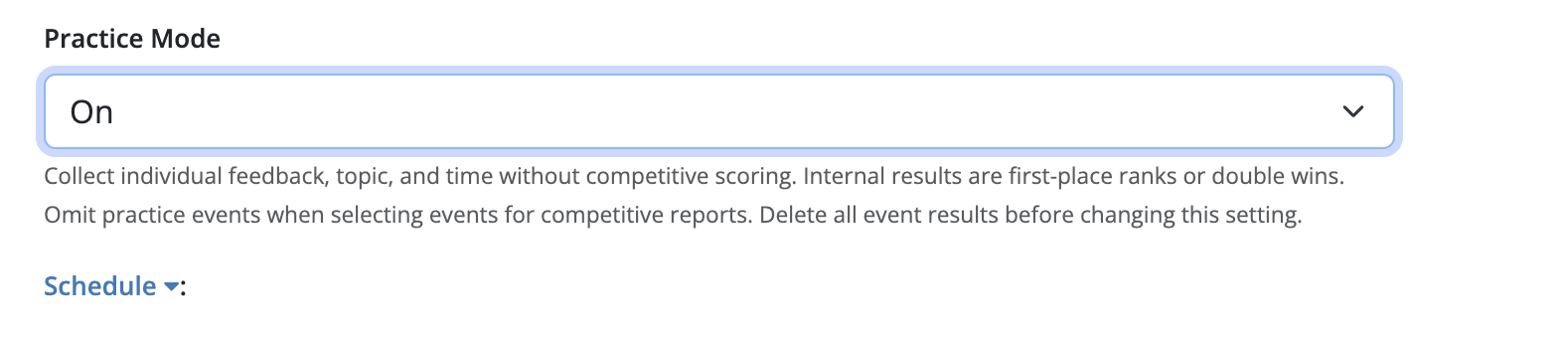
- Go to your list of events and click on the event to edit it.
- Find the Practice Mode dropdown and switch it to On.
- Update the event.
A few things to know:
- You can't change this setting once the event has results recorded. If you need to turn Practice Mode on or off after rounds have run, delete all results for that event first — the setting unlocks automatically once results are cleared.
- Turning on Practice Mode doesn't touch pairings, sweepstakes settings, or advancement rules. Those all keep working as normal.
- Existing results are never converted when you flip the setting — this only affects new ballots submitted afterward.
What judges see
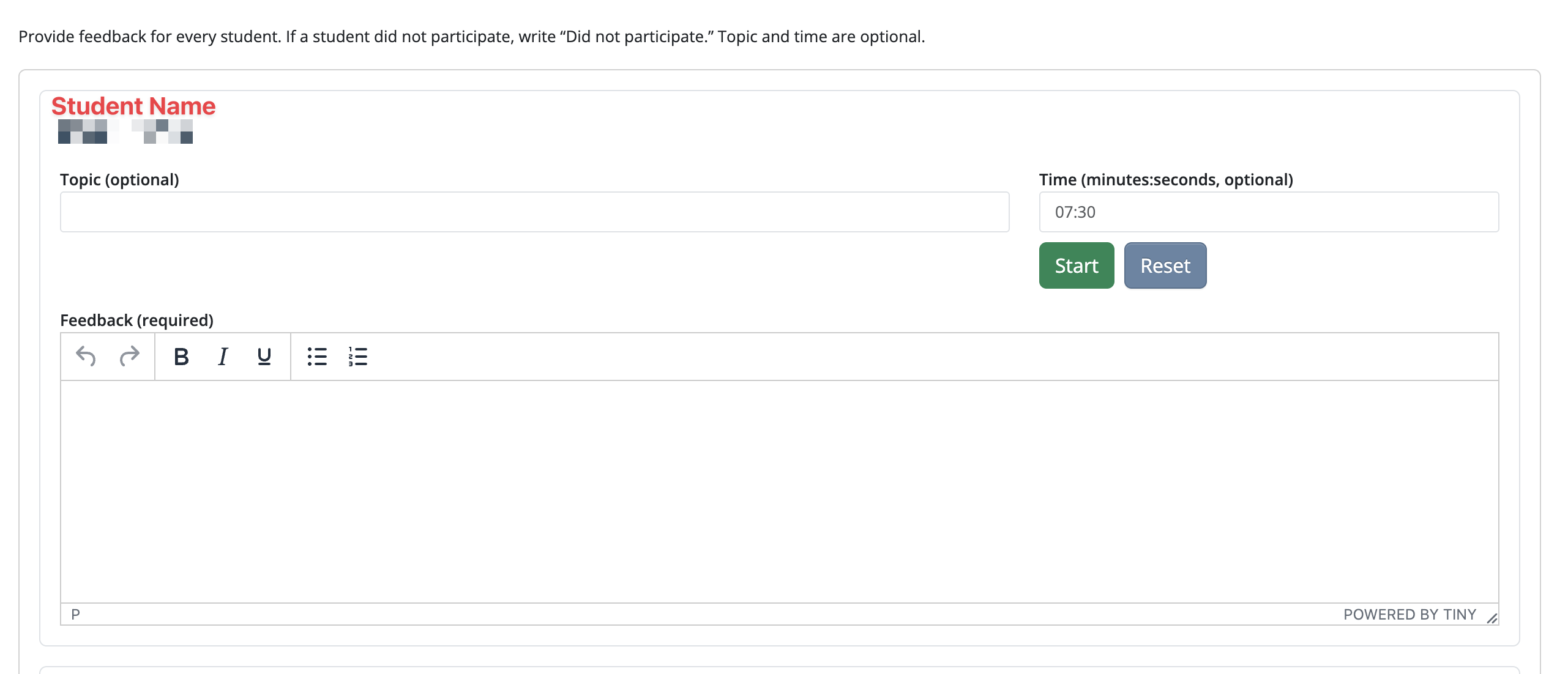
Judges accept and open their ballot as usual. Instead of a scoring form, they'll see one feedback field per student (including every member of a partner or team entry), plus a note that the ballot is a practice ballot and that topic/time are optional.
- If a student didn't participate, the judge can note that in their feedback — there's no separate "no-show" control.
- Judges can save a draft and come back to finish later, just like a normal ballot.
- Once feedback is entered for every student, the judge submits with the Submit Feedback button.
What students and coaches see
Students receive their ePostings just like they would with a regular event. From a student's perspective, they won't even know anything is different.
Once feedback is released, students see their own individual feedback the same way they'd see ballot feedback today — through the student/coach ballot view, feedback emails, and ballot exports (PDF and spreadsheet). Practice ballots show the judge's feedback and round context (event, round, judge), but no ranks, points, or decisions, since none were collected. Thus, students can focus on the feedback rather than the rankings - especially in a practice environment when the rankings are irrelevant.
Reporting
If you have a mix of competitive and practice events, you need to manually exclude practice events when generating competitive reports — use your existing event selectors to leave practice events out of rankings, awards, and sweepstakes reports. The placeholder results exist only to keep the tournament engine running smoothly; they were never meant to be reported as real outcomes.
This feature is ideally suited for use at tournaments with just practice events to avoid confusion.
Deleting results for a practice round
If you use Pair Section → Delete → Results only on a schedule block that includes practice ballots, those ballots reset to "results not received" so judges can reopen and resubmit. Any feedback already written and the judge's acceptance of the assignment are preserved — only the internal placeholder result and completion status are cleared.
FAQ
Can I use Practice Mode for a mix of practice and competitive rounds in the same tournament?
Yes. Practice Mode is set per event, not tournament-wide, so you can run some events as practice and others competitively. It is not advised, though.
Will practice rounds affect my rankings or awards?
No, as long as you exclude practice events from your competitive reports using the existing event selectors. The system doesn't apply this exclusion automatically — it's a manual step when you build your reports. Just don't pick the practice events.
Can I add speaker points or rankings later for a practice round?
No — Practice Mode ballots don't collect speaker points, ranks, or decisions at all. If you need scored results, use a competitive (non-practice) event instead.
Which formats support Practice Mode?
Individual Events (IE) and Debate. Other formats are not currently supported.